

Finding the Fibonacci values
Let’s first think about the Fibonacci sequence. Each number is made by adding the two previous numbers. Here, we start with2 and 3:
a with x. If they are equal, we have found the Fibonacci number we are looking for, so we return True.
Otherwise, this line moves us to the next pair of Fibonacci numbers:
a is equal to x or becomes larger than it. If it becomes larger without finding x, we return False.
For example:
Marking the Fibonacci values
Next, we need to decide which phase each value should receive. We can write another small Python function for it:π? Because a phase change of π reverses the direction of an amplitude.
So just like in the Cantor Set example, we can think of it as putting a small minus sign on the values we want to mark.
We are not removing the other values. We are simply giving the Fibonacci values a different phase.
Starting with the values
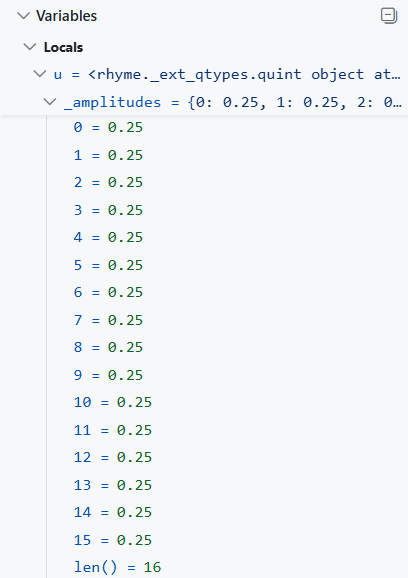
Now let’s create our values. We use:quint with size=4 gives us:
u have equal amplitudes, as shown in the debugger:
Applying the phase
Let’s apply the phase to the Fibonacci values by giving ourmark_fib() function to add_phase():
mark_fib() as the phase function.
For each value, the function checks whether it is a Fibonacci number.
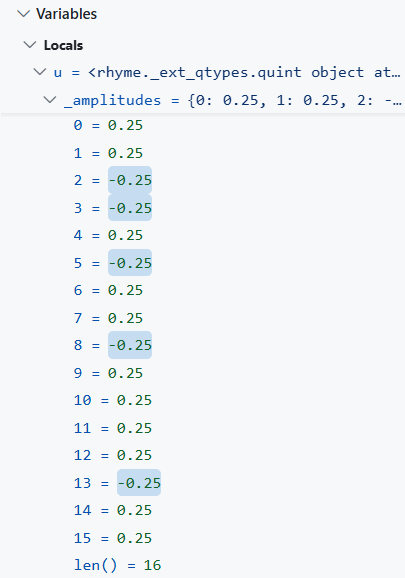
If it is a Fibonacci number, the value gets phase π. Otherwise, it gets phase 0.
So the idea is:
quint with size=4, the result is shown in the debugger:
What changed?
We started with all the values:is_fib() told us which ones are Fibonacci numbers.
mark_fib() turned that answer into a phase:
add_phase() applied that rule.
We did not build the Fibonacci sequence inside the quint.
Instead, we used the sequence to recognize and mark particular values.
And just like with the Cantor Set, the important part is the phase change.
That’s Fibonacci marking with phase in Rhyme!