

0, paired 0 with 2, and used interfere() to grow the pattern.
This time, let’s try something different. Instead of building the Cantor Set step by step, we start with all the values and mark the ones that belong to it.
We will do that with a phase change.
Finding the Cantor values
Let’s first remind ourselves what makes a value part of the Cantor Set. Its ternary digits can only be:1 means that the value is in the middle third, so it is not part of the Cantor Set.
For example, 202 belongs to the Cantor Set because it contains only 0s and 2s. But 201 does not belong to the Cantor Set because it contains a 1.
So we need a small function that can answer one question: Is this value in the Cantor Set?
We can write this function as:
x, one at a time.
If we find a 1, we immediately return False because the value is not in the Cantor Set.
If we check all the digits without finding a 1, we return True because the value belongs to the Cantor Set.
For three ternary digits, for example:
Starting with all the values
Now let’s create the values that we want to check. We use the code below:size = 5, this gives us the values:
n = 3 ternary digits.
So the values with three ternary digits go from:
is_cantor():
27 to 31 are not part of the Cantor Set.
Now we have all the values we need.
At this point, nothing has been marked yet. All the values have the same phase, which is shown in the debugger:
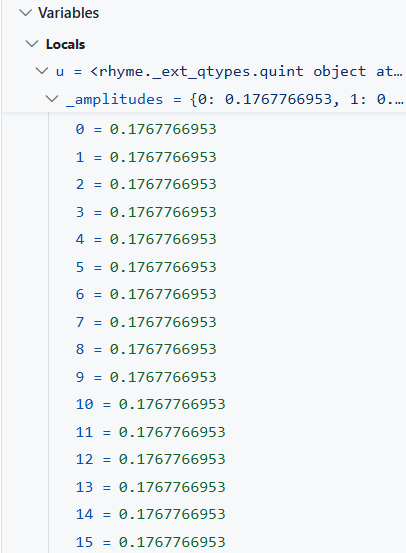 | 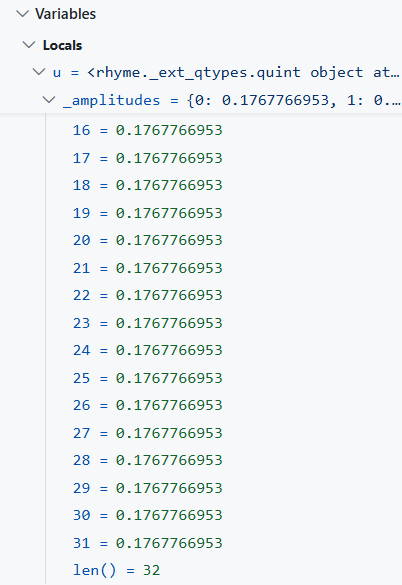 |
Marking the Cantor values
We already know how to check whether a value belongs to the Cantor Set. So we can use the result to choose a phase.π? Because a phase of π changes the direction of an amplitude.
So we can think of it as putting a small minus sign on the Cantor values.
We are not adding or removing any values. We are only changing their phase.
Now we can apply this rule with add_phase():
lambda simply tells add_phase() to use mark_cantor() for each value.
The phase function marks each value according to whether it belongs to the Cantor Set. Cantor values receive a phase of π, while all other values receive a phase of 0.
And now we can see the result in the debugger.
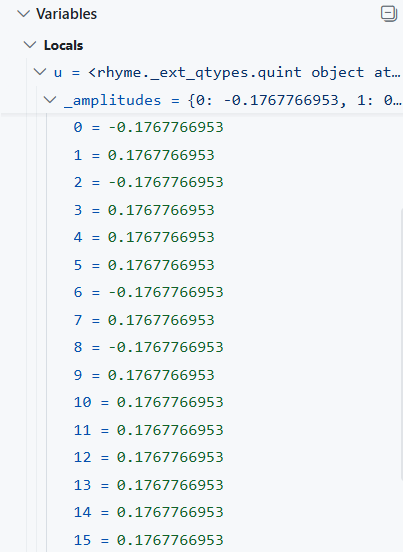 | 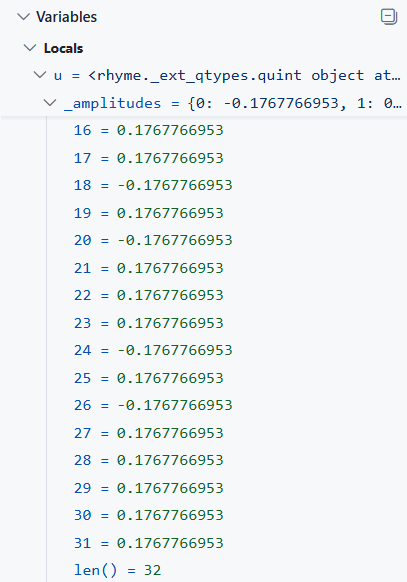 |
What changed?
In the previous tutorial, we built the Cantor Set using interference. We started with:u using quint.all():
π. Otherwise, we give it phase 0.
So the whole idea is: